Thứ Hai, 30 tháng 12, 2019

Magento 2 Auto Invoice & Shipment

Magento Auto Invoice extension simplifies order status management which not only reduces significant manual tasks for admins but also meets customers’ need. Customers always want the place order as fast as possible and at once. With Auto Invoice, when orders are finished, all status of which will be automatically changed into “Complete” and invoices will accordingly be created. As a result, Magetop Auto Invoice will put an end of overload of manually creating an invoice too much for Magento Store Owners.

Auto Invoice & Shipment For Magento 2 Features :

☑️ Enable/Disable extension from the backend.
☑️ Easy to install and configure with your store.
☑️ Helps to make order process quick and automatically.
☑️ Automatically create invoices and shipments process.
☑️ Confirmation email of invoices and shipment send to the customer automatically.
☑️ Generates invoice and shipment process to customers automatically after their order placed.
☑️ Auto Invoice and Shipment Magento 2 extension specially use for offline payment methods.
☑️ And many more options...

What Is The Use Of This Module And Why Should I Use It?

In Magento there is not any functionality to create invoices and shipment invoice automatically. So admin needs to can create invoices and shipment invoice manually. And this process takes more time, when a store has several orders. Auto Invoice and Shipment Magento 2 extension generate automatically with full information of invoice and shipment process. Auto Invoice and Shipment Magento 2 extension is save time to create invoice manual and payment transaction. This extension generates invoice and shipment process to customers automatically after their order placed. Magento 2 extension Auto Invoice and Shipment helps to make fastest order processing, and customers get a confirmation email to automatically send invoices and shipment. Therefore, customers can satisfy with your store’s automatic and quick order process.

Automates Invoices & Shipments
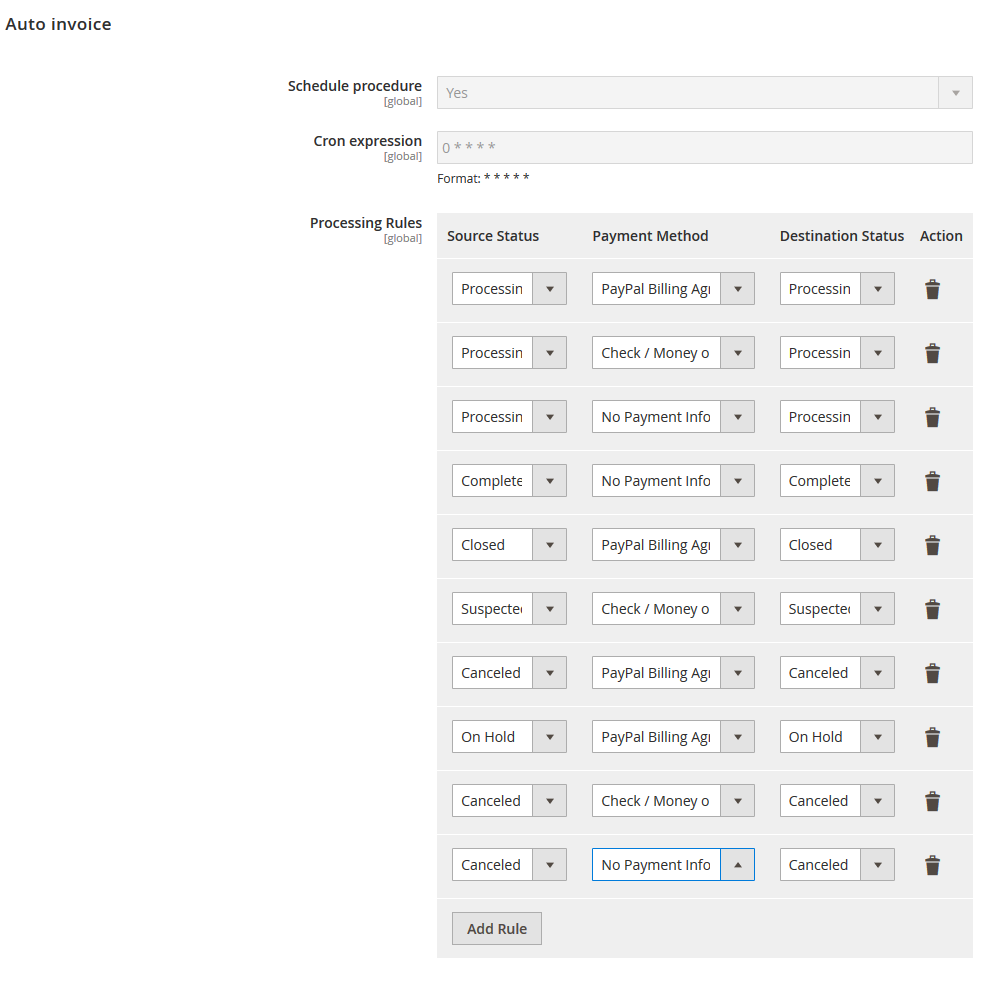
Automates Invoices & Shipments
Option to automate Magento 2 invoices and shipment for the store using Magento 2 auto create invoice extension.
  • Schedule procedure 
  • Cron expression 
  • Processing Rules (Main Options) 
  • Processing Rules (Source Status) 
  • Processing Rules (Payment Method) 
  • Processing Rules (Destination Status) 
  • Processing Rules (Action)

Order Status Change

Auto changes order status to complete once invoice and shipment generation gets completed.
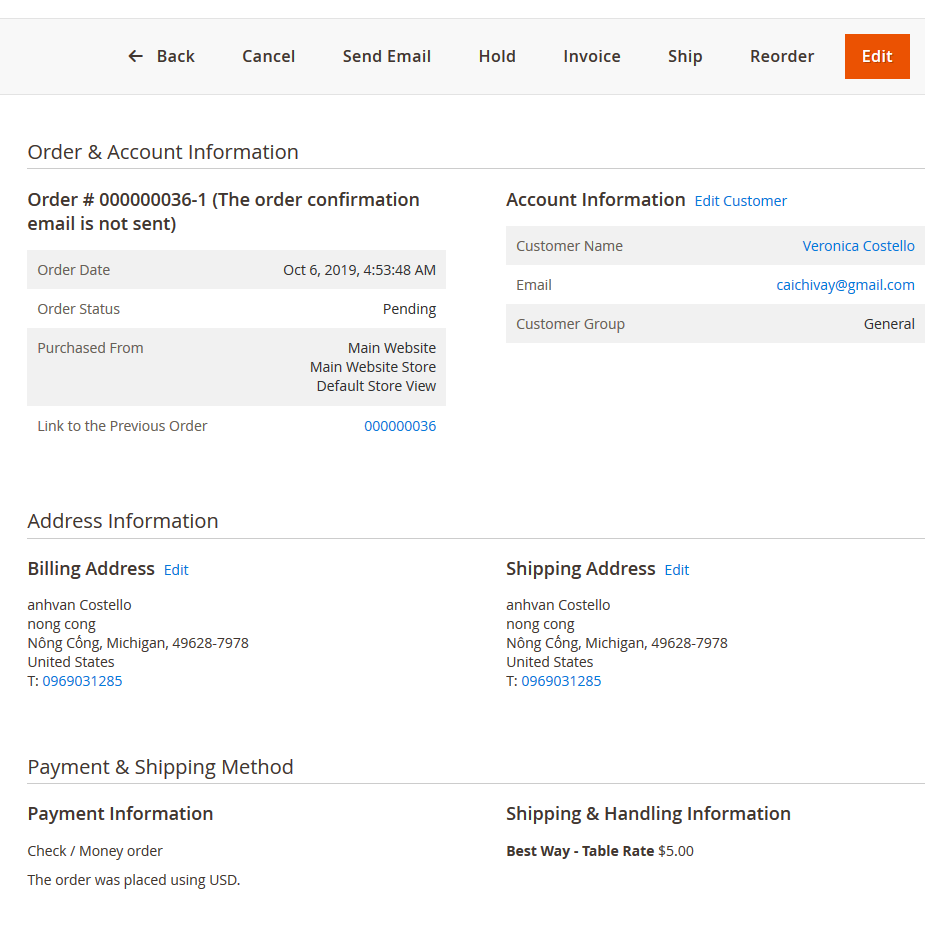
Order Status Change

Automates Emails

It sends invoice & shipment Emails automatically once created in the backend.

Multiple Payment Methods

Provides compatibility with multiple payment methods of your Magento 2 stores.

Improves Trust

Magento 2 auto invoice extension helps improve trust among customers with immediate invoices.

Thứ Tư, 25 tháng 12, 2019

Magento 2 Store Pickup Extension

Magento 2 Store Pickup Extension encompasses the functionalities of Store locator and Store finder because of which the customer can pick up the product from the nearest store with the help of Google maps instant direction feature. Also categorise multiple stores on the bases of City and country, you delivering it to their houses. This helps you provide an added feature which would cater to a lot of your customers.

Store Pickup For Magento 2 Features :
☑️ Create unlimited number of store pick up and store locations.
☑️ Show pickup location based on products in cart.
☑️ Define pickup location on map by longitude and latitude value.
☑️ Define contact details, email, working hours etc for each pickup location.
☑️ For the shipping method, admin will do the setting for Store Pickup.
☑️ Allows multiple pickup location submission using csv upload.
☑️ Allows customer to choose pickup point and specify the date/time of arrival.
☑️ Pickup location will receive email on order confirmation.
☑️ Order details will have all the details about pickup location, date/time.
☑️ Allows you to define marker image on Google map.
☑️ Display all pickup location on map so user can select nearest location easily.
☑️ Search on google map & search within radius in map for nearest store.


What Is The Use Of This Module And Why Should I Use It?

You can create one or more pickup locations (branches) and customer can select the nearest pickup location. For each pickup location, you can define the complete address, contact details, map it on Google map, working hour’s etc details. In case that location is not selected on the map then plugin will try to get the location from the address field. You can also import multiple locations using csv import.

Customer can select the nearest location on map directly or select it using the radiobutton /dropdown. Selected pickup location will be saved against order and will be displayed to admin order section and as well as the frontend customer order details section. Selected pickup store owner will receive the order email with same details. By default, pickup location cost is zero. You can specify cost for pickup locations also. You can place this pickup location options on cart page as well as checkout page. It will automatically load all the stores on map also and you can use search feature to select the store on map. Apart from this, you can place map shortcode on any page to display all pickup points.


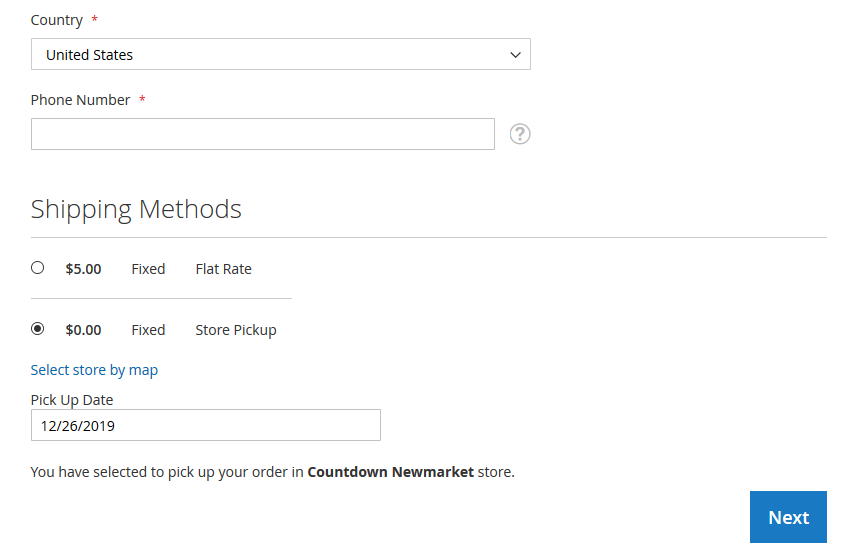
Enable "Store Pickup" As Shipping Method

Enable Store Pickup as Shipping Method
Magento 2 Store Pickup addon allows your customers to choose "Store Pickup" as the shipping method and collect products from the nearest offline shop. Customers can:
  • Select Nearest Shop for Collection on Google Map
  • Select Delivery Date & Time on Checkout Page


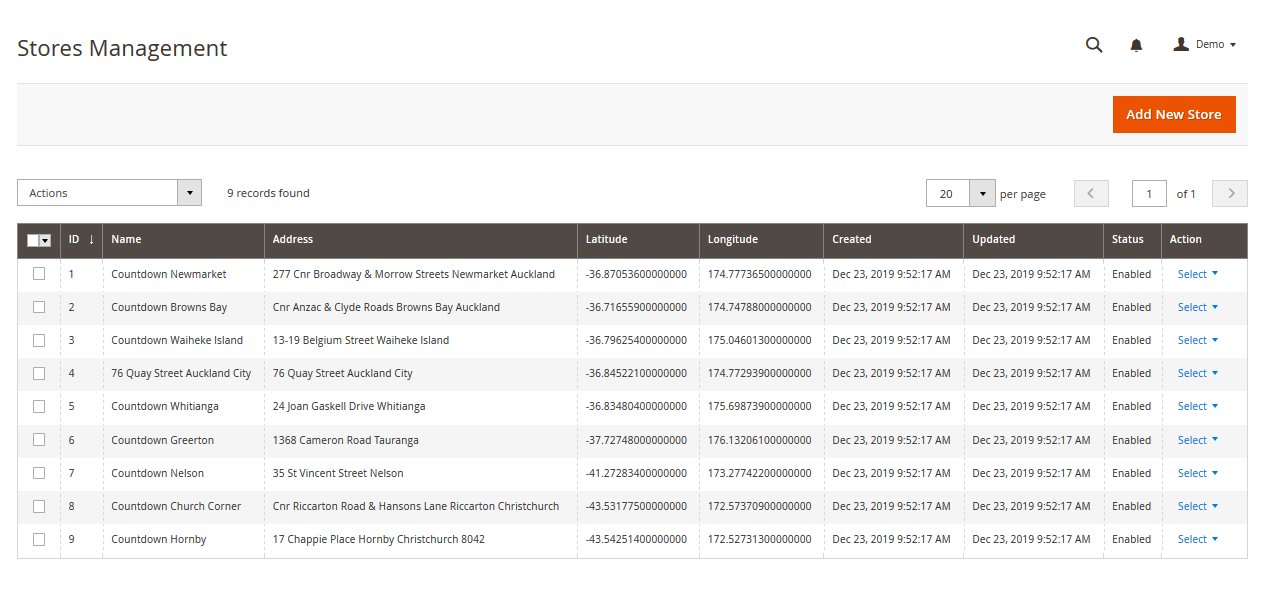
Add Unlimited Store Locations

Add Unlimited Store Locations

This Store locator plugin allows you to create multiple shops & outlets with product availability and display them on a guided Google Map.
Magento 2 Store Pickup extension includes full features of our Shop Locator Plugin that empowers you to display these locations on separate page. You can add new locations with the following details:
  • Setup Store Name 
  • Setup Store Address 
  • Setup Working Time 
  • Setup Google Maps Location with Latitude & Longitude values


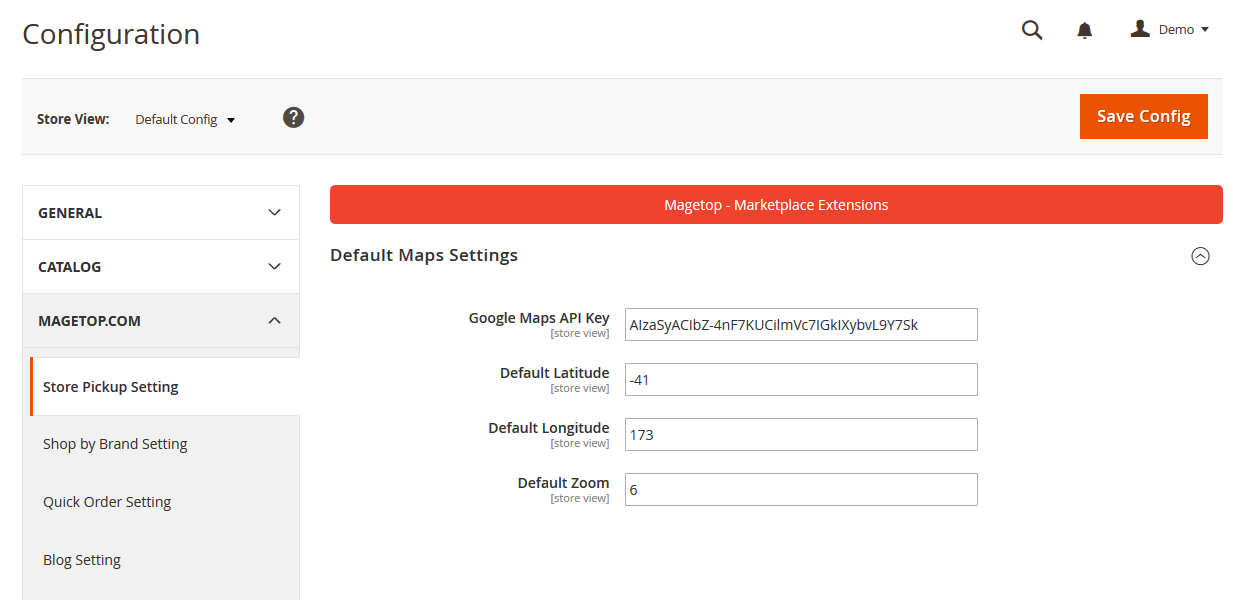
Default Maps Settings

Default Maps Settings

You can change Default Maps Settings from the backend.
  • Google Maps API Key 
  • Default Latitude
  • Default Longitude 
  • Default Zoom

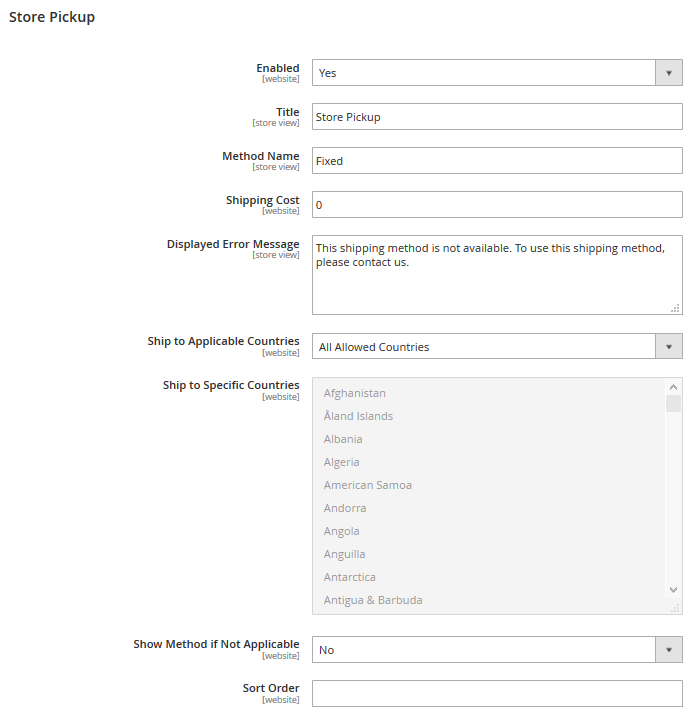
Configuration Settings

Configuration Settings
You can change these configuration settings of Pickup Shipping Method from the backend.
  • Setup Method Name
  • Setup Shipping Cost
  • Setup Displayed Error Message
  • Setup Ship to Applicable Countries
  • Setup Ship to Specific Countries
  • Setup Show Method if Not Applicable
  • Setup Sort Order

Thứ Sáu, 6 tháng 12, 2019

Free Magento 2 Ajax Cart Extension

Magento AJAX Cart is a Great Plugin that changes the default behavior of Magento Cart Page, allowing a buyer to see the Total price calculation when change the Quantity of a product, without need to manually click on “Update cart” button.

Ajax Cart For Magento 2 Features :

- Automatically reload and recalculate Cart using AJAX when quantity changes.
- Show -/+ buttons around item quantity on cart page.
- Show item quantity as select instead numeric field.
- Show user confirmation when change item quantity to zero.
- Allow to change/synchronize quantities in shop, minicart and single product pages.
- Make the Add to cart button to perform with AJAX, without full page reload.
- Faster AJAX reload call when change quantities in Cart page.
- Option to lock quantity inputs to allow only change using plus and minus buttons.
- And many more options...

Streamline Shopping Experience

The Ajax Cart extension streamline the add-to-cart process, allowing customers to order the product from any page of your store quickly. Make your website more professional and attractive.
- Quickly add the product to cart using Ajax pop-up on any page. e.g., home, cms, category, catalog search, product pages, etc
- Select product options right from the add-to-cart window without redirecting to the product page 
- Add more products from the promoted products (related and cross-sells) to cart
Return to the same page, category or custom page after adding the product to cart is done
- Update product quantity in the popup
- Add multiple products to cart without reloading the page
The AJAX Cart extension is fully responsive to mobile devices; the mobile ready layout looks great on any screen type and size. allowing customers to shop anytime and anywhere.

AJAX Shopping Cart Display

The AJAX Shopping Cart extension allows customizing the pop-up window by enriching it with options benefiting your customers.
- Display product image, cart qty, cart subtotal, quantity box, and go-to checkout button in the pop-up
- Display the countdown timer on continue shopping view cart button, allowing shoppers to see the time left the dialog window is going to close
- Display related or cross-sell products in the popup to motivate customers to add more products to cart
- Limit the number of related or cross-sell product to display in the cart

Ajax Cart Configuration

The ajax cart extension is easy to install and configure; it takes only a few options to set up the extension, which could be done in under few minutes. Store administrator can control each functionality of the extension from the admin panel.
- Enable or disable the extension from the admin panel
- Enable/disable the flying image animation
- Choose to redirect customers to the product page if no custom options are selected/specified
- Select what to display in the AJAX confirmation pop-up (after product is added to the cart). Eg. product image, product number in cart, cart subtotal, product qty box, go-to checkout button
- Define the "Continue Shopping", "Go To Checkout" and "View Cart" right from the admin panel
- Set the countdown time to close the pop-up window
- Enable/disable AJAX Popup at the product page
- Specify whether the "Continue Shopping" button on a product view page should lead to the category page, custom page or remain on the product page
- Show/hide product relationships (related and cross-sell) in the pop-up
- Define the product relationships block title. Specify the number of related, up-sells or cross-sell product to show in the pop-up