Thứ Sáu, 31 tháng 5, 2019

Magento 2 Ajax Layered Navigation Extension by Magetop

Magento 2 Ajax Layered Navigation Extension by Magetop brings a list of filters to help your customers search and get their favorite products in the shortest way. This extension applies the modern AJAX technology to enhance the filtering systems to boost the satisfaction of customers towards every filtering action on pages.

When it comes to building a successful online store there are a great number of factors involved. A well-designed, user-friendly navigation is one of the most important aspects which directly affect customer shopping experience and search engine rankings.

Want to get an exclusive selection of features for total navigation optimization? Welcome on board!

Equip your website with a highly flexible vertical and horizontal navigation menu. This Magento 2 product & price filter toolbox lets your customers filter products by attribute of any kind, use custom price sliders and 'from-to' widgets. Add pages for brands with stunning logos and detailed information and optimize your store for search engines.


Ajax Layered Navigation For Magento 2 Features :

☑️ Ajax Loading page.
☑️ Enhance UX by Ajax technology.
☑️ Lightening-fast Ajax Navigation.
☑️ Ajax Add to wishlist.
☑️ Multi-filters & Filter the options.
☑️ Responsive & Retina Devices Support.
☑️ Cut down filtering time and eliminate wait time.
☑️ Result products are automatically loaded after each filtering.
☑️ Product is added to wishlist without navigating to the Wishlist page.
☑️ Stay on page after adding products to wishlist.
☑️ Enhance customer experience during shopping time.
☑️ 100% Open-source, Support multi-store, Support multi-language.
☑️ Easy to install and customize.


What Is The Use Of This Module and Why Should I Use It?

In default Magento 2, when customers pick only one small attribute of a product such as color or size, it is likely that the whole page has to be loaded. It leads to the fact that traffic travels between customers and server are too many. Due to the long wasting time for loading filters, customers feel exhausted and tend to abandon shopping. As a result, the bounce rate will increase significantly.

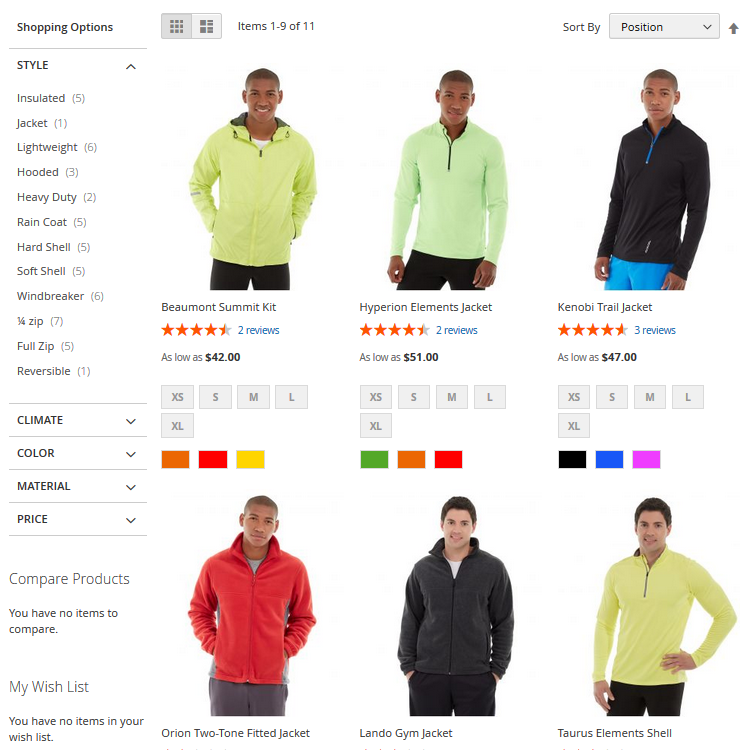
Enhance UX by Ajax Technology

Ajax Layered Navigation released by Magetop brings a great benefit of improving user experience significantly. Using Ajax, online stores can cut down a deal of time on whole-page loading and customers’ wasting time, which creates inconvenience and annoying feeling towards the users. Instead, the server only loads the chosen attributes appointed by customers and takes no action to the others. As a result, the site becomes much more user-friendly and boosts the shopping experience of visitors.
Enhance UX by Ajax Technology

Ajax Add to Wishlist

While in Magento 2 Default, when customers feel interested in specific products and click on Add to wishlist button, they will be navigated to the wishlist page, which is not necessary for customer purpose. Ajax Layer Navigation extension will keep logged-in customers staying on even with their “Add to wish” being clicked.
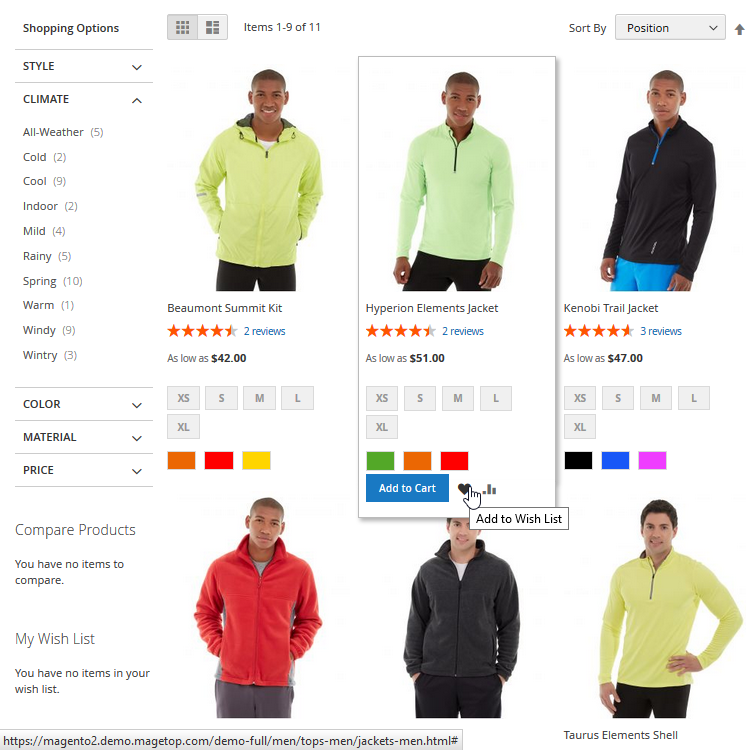
Ajax Add to Wishlist

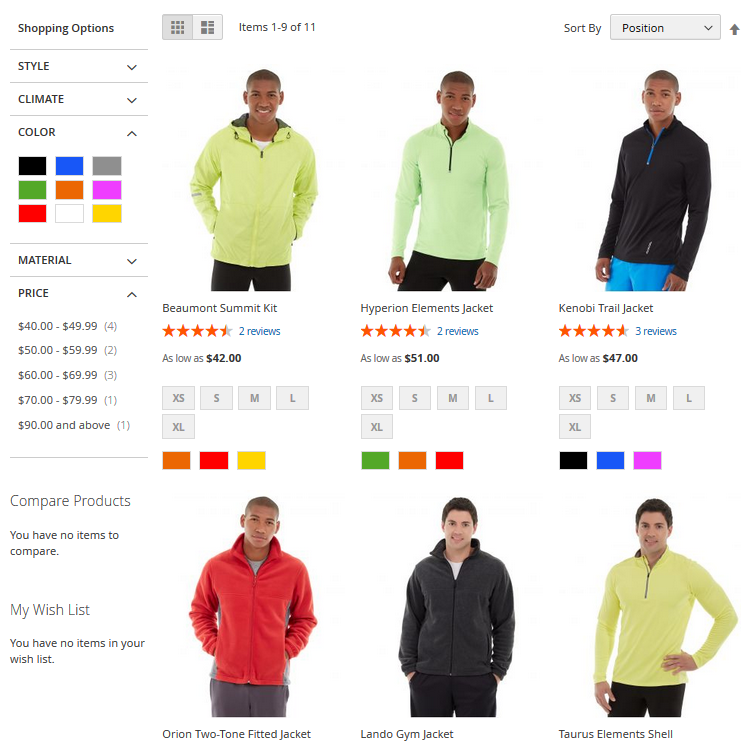
Lightening-fast Ajax Navigation

Ajax Navigation allows automatically loading and displaying a filtered attribute at a glance after a filter performance is taken, while other parts of page keep constant. The exhausting wait for loading the entire page has been eliminated thanks to this excellent Ajax technology. Some main features of products such as product name, product image or description are fixed to facilitate the loading of other attribute selections like the color and size. Therefore, the shopping time and checkout process become speedy effectively.
Magento 2 RMA Return Shipping Label

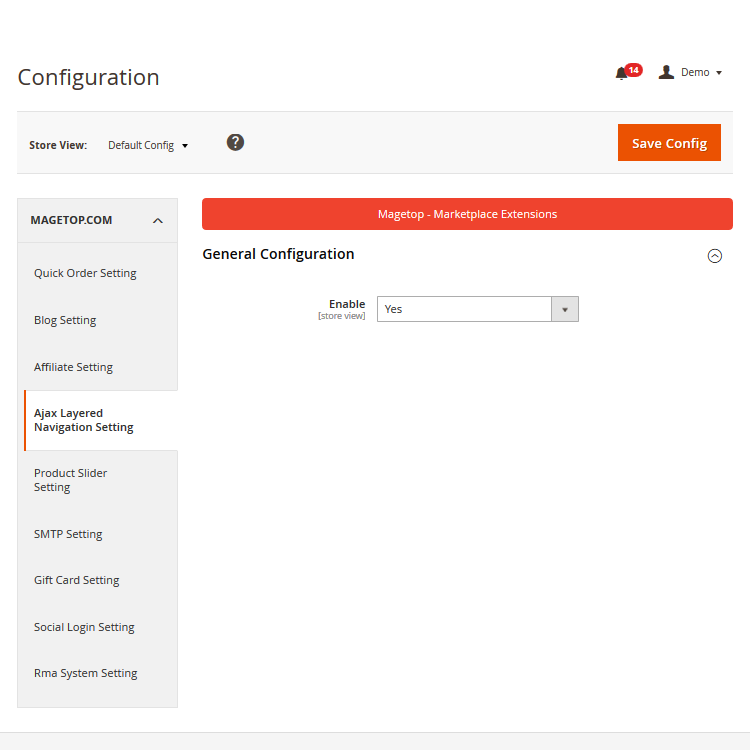
Magento 2 Ajax Layered Navigation Configurations

Magetop Ajax Layered Navigation extension for Magento 2 works as one of the most typical features of Layered Navigation extension, both of which are fully compatible. The combination of both extensions brings about the best site performance and boosts shopping experience of users optimally. With multi-filtering action, Ajax Layered Navigation still well supports to show product results fast and smoothly.
Magento 2 Create RMA Custom Fields

Thứ Bảy, 18 tháng 5, 2019

Magento 2 RMA Extension by Magetop

Magento 2 RMA Extension by Magetop allows the customer to create return request for the purchased products. Return merchandise authorization module also allow guest user for RMA form. A customer can create a shipping label for return/exchange products.


RMA System For Magento 2 Features :
  • Send and receive file attachments with the messages.
  • Create customizable fields for the RMA Request Form.
  • Guest Customers can generate RMA too.
  • Buyer and Admin can communicate using the RMA system.
  • RMA History with Filters and Pagination.
  • Show Return Policy Page to customers.
  • Dynamic order selection with various option.
  • Print RMA details and shipping label easily.
  • The customer can also enter consignment number and upload images after RMA generation.
  • The admin can manage RMA status as well as Reasons.
  • The customer and the admin receive notification emails.
  • Using Return Quantity, the admin will return RMA quantity to their store.
  • The admin can select the allowed product types for RMA.
  • 100% Open-source, Support multi-store, Support multi-language.
  • Easy to install and customize.
What Is The Use Of This Module and Why Should I Use It?
Magento 2 Product Return RMA (Return Merchandise Authorization) allows the store owner to integrate RMA system for its customers so that they can create a request for product return. RMA is very useful for managing product return/refund/exchange/order cancellation.
With the help of Magento 2 RMA Extension, a registered customer or a guest customer can return the products, have them exchanged or refunded within the admin specified time limit.
Module Configuration
After the module installation, the admin will configure the module. The admin will do the following settings:

  • Select allowed products for the RMA request.
  • Content for the Return policy.
  • Set the store admin name and email address for receiving RMA requests.
  • Set number of days up to which a customer can create a request for RMA.
  • Admin can select “Allowed Order Status”.
  • Allow New RMA Request for Cancelled Requests - Yes/No.
  • Allow New RMA Request for Declined Requests - Yes/No.
  • Enter content for New RMA Message to customer.

Manage RMA Reasons
Here, the admin can manage the RMA reason which is used by the customer at the time of RMA request.

  • Create multiple RMA reasons for a request.
  • Set status as enabled or disabled, or delete.

If a customer creates an RMA request for multiple products, different reasons can be selected for each product.
Return Shipping Label
The admin can create a return shipping label for the new and existing orders.


  • Set return shipping label price, title, select status.
  • Upload image for the shipping label.
  • Admin can preview the shipping label.
  • Edit the shipping labels or delete them.


Create RMA Custom Fields
The admin can create customizable fields for the Request New RMA form. Various types of fields can be created such as – radio button, checkbox. The additional fields allow the admin to get more information from the customers.

  • Enter the name of the custom field that will appear on the frontend.
  • The following types of fields are available: Text, Text Area, Dropdown, Multiple Select, Radio Button, CheckBox.
  •  Set the sorting order of this field using 0,1,2,3 etc.
  • Required Values – Select Yes if you want to make this field as the required field.
  • The customer will not be able to submit the RMA request unless they fill this field information.
  • Status – To show this custom field on the frontend, select Yes. Otherwise select No for hiding this field.


RMA Request Form

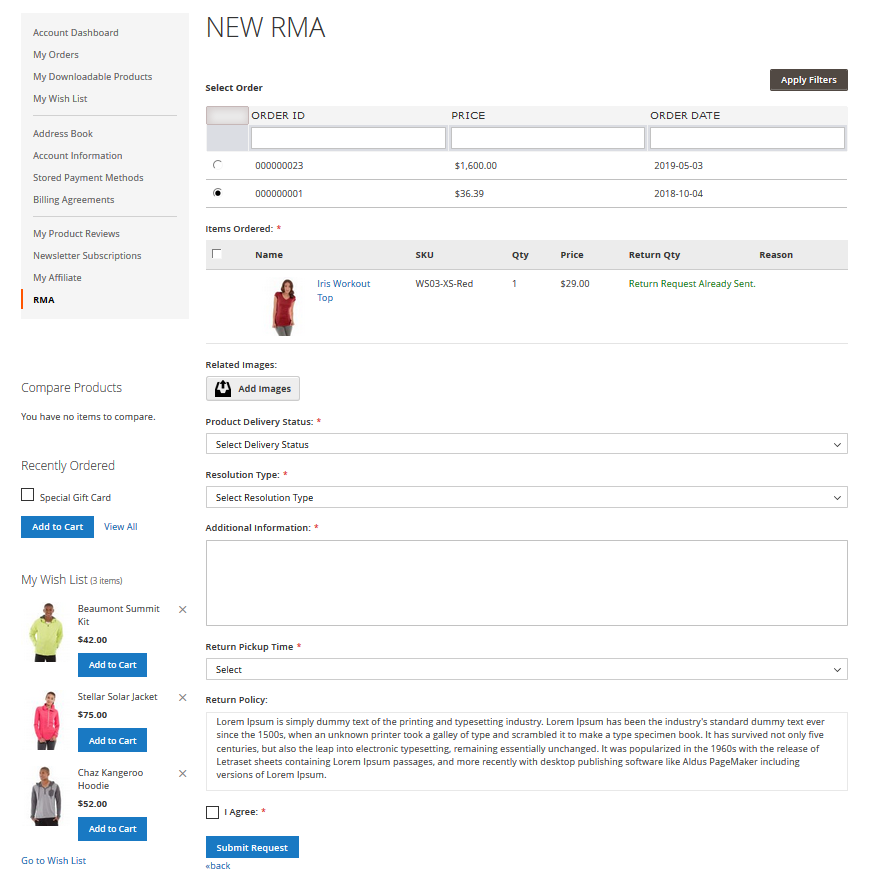
Using Magento 2 RMA, the buyer can create multiple RMA request with return reason. The user can send the damaged product image. The customer will do the following:

  • The customer will select the order ID on which he wants the RMA.
  • The customer will select a product for the RMA and select the reason behind the RMA.
  • The user will upload images, the select package condition, resolution type.
  • The customer can also add additional information, select product delivery status.
  • At last, the user will accept terms and conditions.

Magento 2 RMA Request Form
RMA History & Conversation
The customer and admin can view the complete history and conversations related to the RMA request. All the records are maintained in the RMA request for better manageme


  • View Date & Time.
  • Download Attachments.
  • All the conversations are stored and can be viewed later.
  • Email notifications to the customer when a new message is received.


Magento 2 RMA History & Conversation