RMA System For Magento 2 Features :
- Send and receive file attachments with the messages.
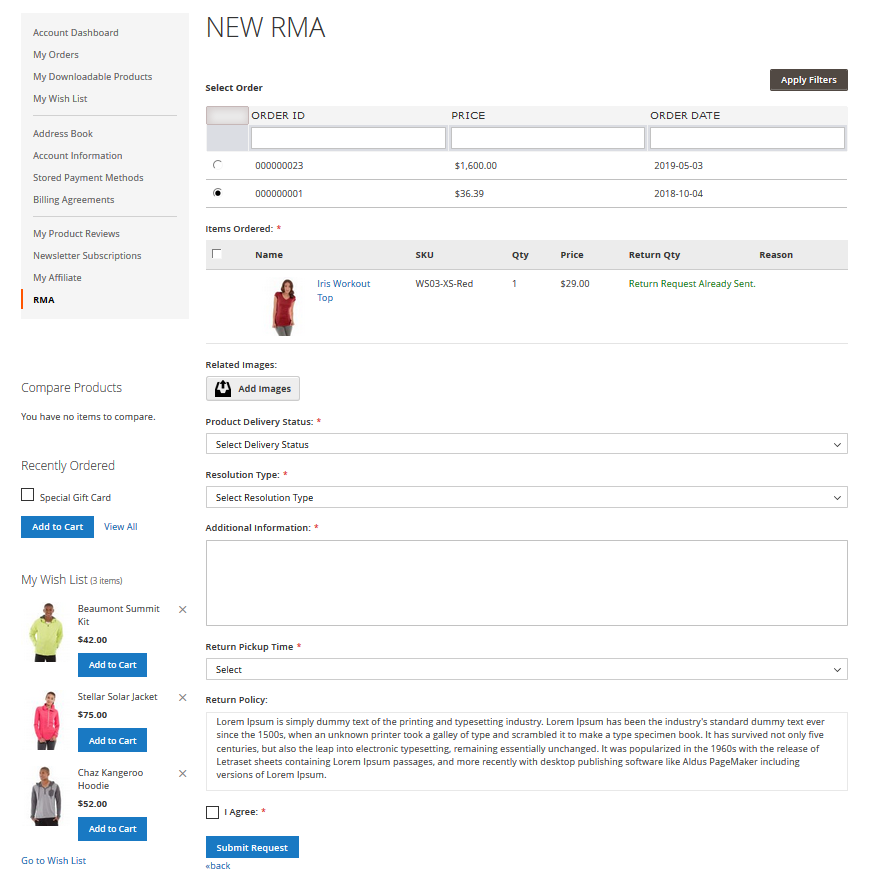
- Create customizable fields for the RMA Request Form.
- Guest Customers can generate RMA too.
- Buyer and Admin can communicate using the RMA system.
- RMA History with Filters and Pagination.
- Show Return Policy Page to customers.
- Dynamic order selection with various option.
- Print RMA details and shipping label easily.
- The customer can also enter consignment number and upload images after RMA generation.
- The admin can manage RMA status as well as Reasons.
- The customer and the admin receive notification emails.
- Using Return Quantity, the admin will return RMA quantity to their store.
- The admin can select the allowed product types for RMA.
- 100% Open-source, Support multi-store, Support multi-language.
- Easy to install and customize.
What Is The Use Of This Module and Why Should I Use It?
Magento 2 Product Return RMA (Return Merchandise Authorization) allows the store owner to integrate RMA system for its customers so that they can create a request for product return. RMA is very useful for managing product return/refund/exchange/order cancellation.
With the help of Magento 2 RMA Extension, a registered customer or a guest customer can return the products, have them exchanged or refunded within the admin specified time limit.
Module Configuration
After the module installation, the admin will configure the module. The admin will do the following settings:
- Select allowed products for the RMA request.
- Content for the Return policy.
- Set the store admin name and email address for receiving RMA requests.
- Set number of days up to which a customer can create a request for RMA.
- Admin can select “Allowed Order Status”.
- Allow New RMA Request for Cancelled Requests - Yes/No.
- Allow New RMA Request for Declined Requests - Yes/No.
- Enter content for New RMA Message to customer.
Manage RMA Reasons
Here, the admin can manage the RMA reason which is used by the customer at the time of RMA request.
- Create multiple RMA reasons for a request.
- Set status as enabled or disabled, or delete.
If a customer creates an RMA request for multiple products, different reasons can be selected for each product.
Return Shipping Label
The admin can create a return shipping label for the new and existing orders.
- Set return shipping label price, title, select status.
- Upload image for the shipping label.
- Admin can preview the shipping label.
- Edit the shipping labels or delete them.

Không có nhận xét nào:
Đăng nhận xét